
Migrate to SpaceYard
Adopt Laravel projects from XAMPP, Herd, Laragon and other local stacks.
If you already have Laravel projects in another local stack, Migration helps you adopt them into SpaceYard without moving or deleting the original source environment first.
What Migration is for
Use Migration when your project already exists in one of these places:
- XAMPP
- Laravel Herd
- Laragon
- WampServer
- MAMP on macOS-compatible sources referenced by the migration screen
- A normal folder containing one or more Laravel applications
SpaceYard inspects the chosen source root, finds compatible Laravel projects, and prepares a reviewable migration plan. The old stack is not removed automatically.
What SpaceYard can adopt
Depending on what it detects in the source root, SpaceYard can adopt:
- Laravel projects
- PHP runtime bindings
- Local database supervision settings when safe import conditions are met
- Local Redis supervision settings when safe import conditions are met
- Project database links discovered from the migrated applications
The migration review clearly separates what is available, what is safe to import, and what will be skipped.
Open the Migration page
- Open the SpaceYard desktop application.
- In the left sidebar, look under Development.
- Select Migration.
- Choose the source type that matches your old stack, such as XAMPP, Laravel Herd, Laragon, or Laravel folder.
The Migration page shows the supported source stacks up front so you can choose the root folder that best matches the workspace you are leaving.
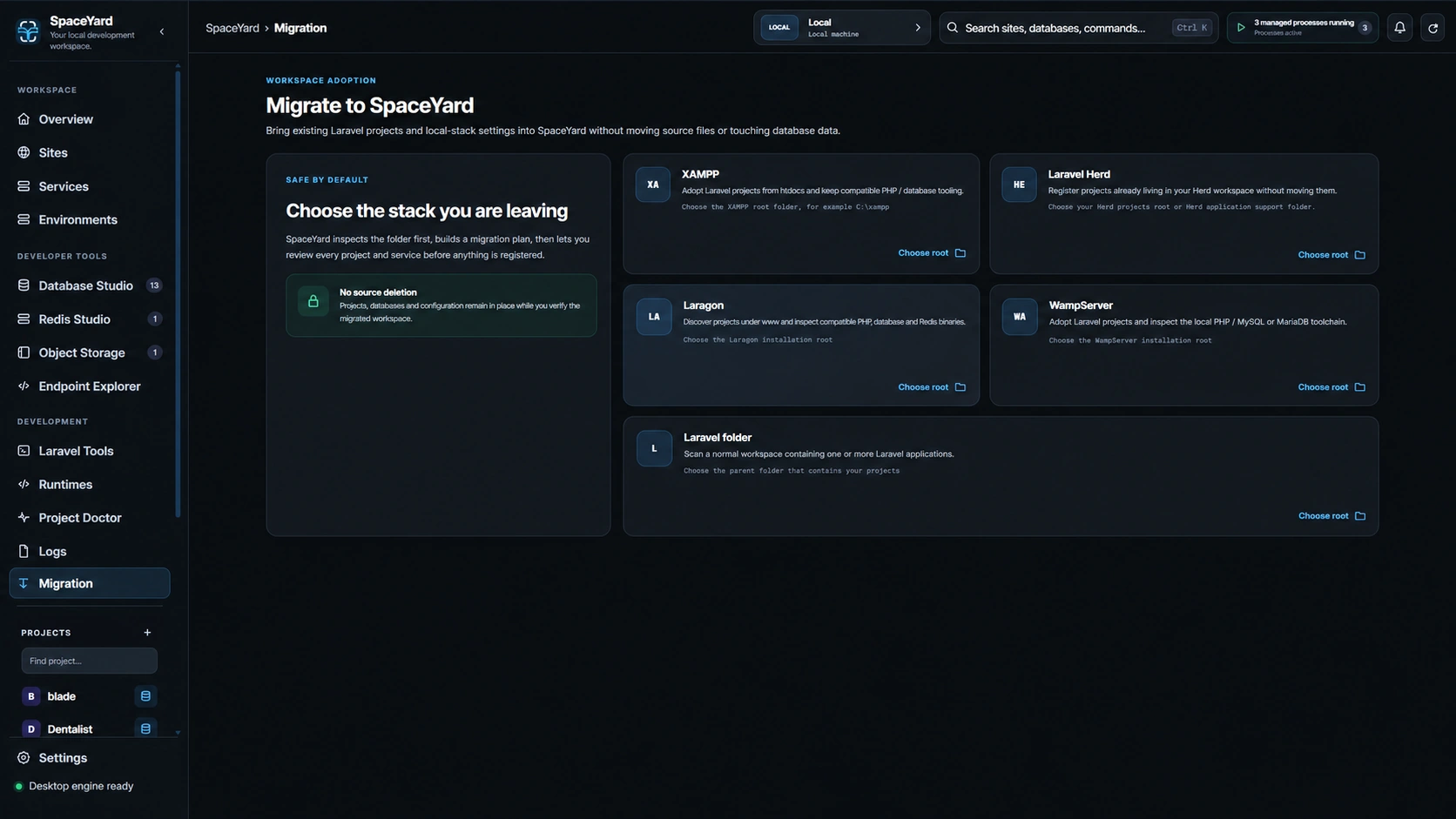
Choose a source root
After you select a source type, SpaceYard asks for the root folder to inspect.
Examples:
- XAMPP on Windows:
C:\xampp - Laragon: the Laragon installation root
- Laravel Herd: your Herd projects root or Herd application-support folder
- Laravel folder: the parent folder containing one or more Laravel apps
Choose the top-level folder for that stack rather than an individual Laravel project when possible. This helps SpaceYard detect shared PHP, database, and Redis tooling.
Review the migration plan
After inspection, SpaceYard shows a migration plan before anything is applied.
Review these sections carefully:
- Laravel projects: the applications found in the selected source
- Resources: PHP, database, and Redis items that can be imported
- Warnings: anything that could not be proven safe or needs manual review
- Safety notes: the checks SpaceYard used before allowing service import
Only the projects you select are adopted.
Choose what to migrate
Before applying the plan, choose the items you want:
- Projects: Select the Laravel applications to register in SpaceYard.
- Use source PHP for migrated projects: Keeps the detected PHP toolchain available as a project binding when found.
- Import database server supervision: Available only when SpaceYard can prove the database configuration is safe to supervise locally.
- Import Redis supervision: Available only when SpaceYard can prove the Redis configuration is safe to supervise locally.
If a database or Redis item is disabled, treat that as an intentional safety block rather than a failure.
Apply the migration
- Confirm the selected projects and optional resources.
- Select Apply migration.
- Wait for the result summary.
- Review any skipped or failed items before changing your old stack.
When migration finishes, SpaceYard reports:
- adopted projects,
- linked database connections,
- created PHP bindings,
- imported services,
- and any warnings or exceptions.
After migration
After a successful migration:
- Open Projects & Sites and confirm the adopted projects appear correctly.
- Review each project's Local domain, PHP runtime, and database connection.
- Open Database Studio or Redis Studio if you imported local services.
- Start the project from SpaceYard and verify the application behaves as expected.
- Keep the original stack installed until you are satisfied that the migrated workspace is correct.
Important safety notes
- SpaceYard inspects first and applies later; it does not immediately change the source stack during inspection.
- Migration does not mean your previous stack is deleted or uninstalled.
- Importing database or Redis supervision is allowed only when loopback-safe conditions can be verified.
- Review the result summary before uninstalling XAMPP, Laragon, Herd, or another previous tool.
Troubleshooting
- No Laravel projects were found: Re-check the folder you selected and choose the parent folder that actually contains the Laravel applications.
- A database or Redis import is disabled: SpaceYard could not prove the service configuration was safe to supervise. Continue with project adoption, then configure that service manually if needed.
- Migration completed with exceptions: Successful items are kept. Read the result list, correct the remaining issue, and rerun migration if necessary.
- You only want a fresh new project instead: Use Create a Laravel project instead of Migration.